
NutraLog for Coaches: client nutrition tracking
How Coaching CRM works for personal trainers and nutrition coaches: invite clients, set calorie and macro goals, review their week, meals, and warnings.
Ante Vuletić · 2026-10-24
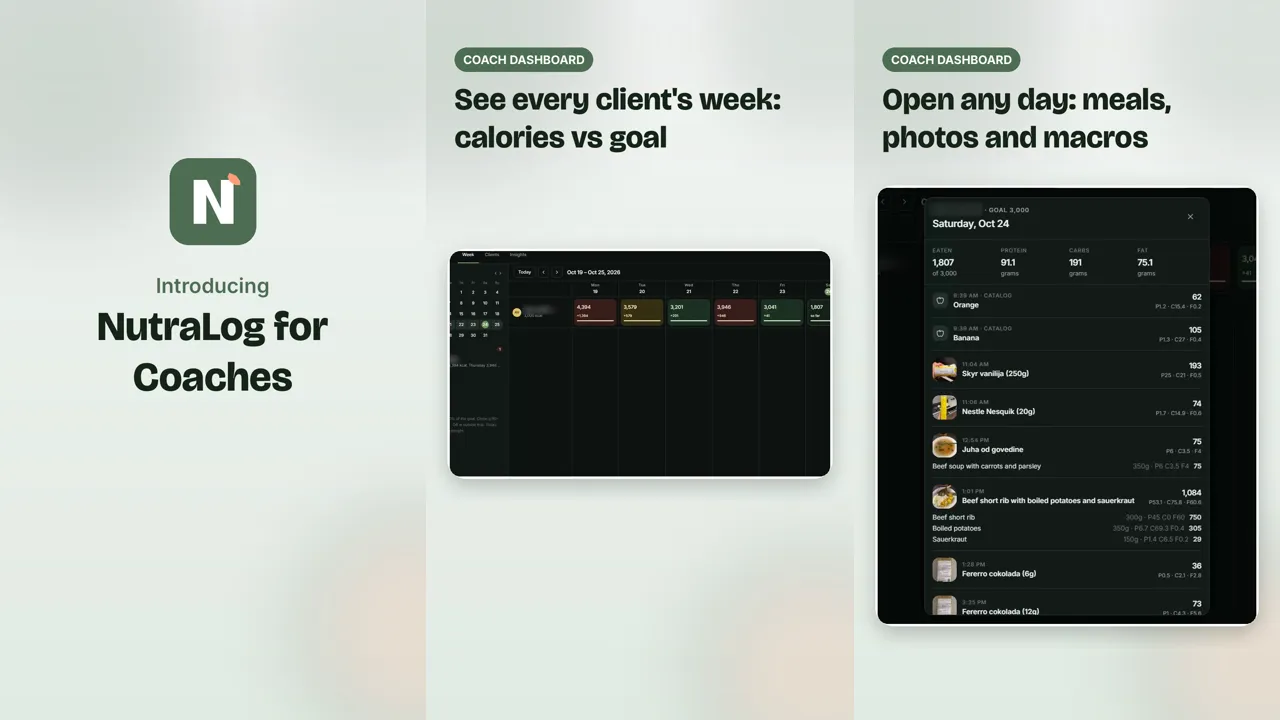
NutraLog for Coaches is a plan for personal trainers and nutrition coaches who want to see what their clients eat. It is called Coaching CRM in the app. Your clients log meals in NutraLog by taking a photo. You set their daily calorie and macro goals, see each client's week against those goals, open any day for the meals, and read weekly insights with warnings. This post describes what the plan does today and how a coach and a client use it.
Calories and macros from a meal photo are AI estimates. Clients can adjust amounts so the log matches what they ate. NutraLog is a logging tool, not medical advice.
What the plan costs and includes
Coaching CRM is $150 a month, billed in USD. It covers up to 50 client slots. There is no trial. It is a separate subscription from Pro, which is the plan for your own unlimited AI scans.
| Coaching CRM | |
|---|---|
| Price | $150/month, billed in USD |
| Clients | Up to 50 slots |
| Trial | None |
| Goals you can set | Daily calories, protein/carbs/fat split, micronutrient targets |
| Coach views | Week, Clients, Insights, and a day view per client |
| Client sees | Your trainer set this goal. Goal fields are read-only while it is on |
Step 1: subscribe and open the coach workspace
Create a NutraLog account from the coach sign-up, or sign in if you already use the app. Coaching CRM is under General, Other, in the app. Checkout is through Link (Stripe Managed Payments). Once the subscription is active, the coach workspace has three tabs: Week, Clients, and Insights. The plan is also listed on the pricing section of the home page.
Step 2: invite your clients
On the Clients tab, enter a client's email and send an invite, or copy a one-time invite link and send it yourself. The client opens the link, signs in or creates a free NutraLog account, and sees what they are about to share: meal photos, each food with calories, protein, carbs, and fat, and how their days compare with the goals you set. Nothing is shared until they choose Accept and share.
Each client uses a slot. A pending invite also holds a slot until the client accepts, you revoke it, or it expires after 14 days. The Clients tab shows how many of your slots are in use, each client's status, whether their goals are locked by you or their own, and when they last logged.
A client can disconnect at any time from General in the app. Access ends immediately. You can see their logs, but you cannot edit or delete their meals.
Step 3: set calorie and macro goals
For each connected client you set a daily calorie goal in kcal and a macro split in whole percentages for protein, carbs, and fat that add up to 100. You can also set micronutrient targets. Those fields start from general adult daily guidelines, and micronutrient tracking is a best-effort estimate.
When you save, the goal is locked on the client's side. Their Today screen shows “Your trainer set this goal.” and the goal fields in their settings are read-only. They keep logging as usual. If you clear the goal, the lock comes off and the client sets their own goals again.
Step 4: clients log meals with a photo
Clients log the way any NutraLog user does. They photograph a plate and get an estimate of calories, protein, carbs, fat, and a best-effort set of micronutrients. They can also photograph a nutrition label, pick a food from the catalog, or speak or type a meal. Coaching CRM does not change a client's own plan. On the free plan a client has 10 lifetime AI scans, after which catalog foods and labels they already scanned still log without a scan. Pro (€4.99/month or €49.99/year) removes the lifetime cap. The free MyFitnessPal alternatives post explains the free limits in more detail.
Step 5: check the week
The Week tab lists every client with one cell per day showing calories eaten against their goal. A month calendar on the side moves between weeks. Each finished day is colored by how close it was:
- On track: 90–110% of the calorie goal
- Close: 80–90% or 110–120%
- Off target: outside 80–120%
- No log: nothing logged that day
Today stays open until midnight, so it is not counted as on or off target until the day is over.
Step 6: open a day
Open any client's day to see what they logged: the time of each meal, the meal photo, each item with its amount, and calories, protein, carbs, and fat per item and for the day, next to their calorie goal. Entries logged from the catalog or by dictation are labeled Catalog or Dictation.
Step 7: read the insights and warnings
The Insights tab shows one client's week: calories per day against the goal, daily average protein, carbs, and fat against target, and daily average micronutrients against their guideline. Averages and warnings only use finished days. A warning appears when:
- a finished day is outside 80–120% of the calorie goal
- protein averages under 80% of target
- a micronutrient averages under 80% of its guideline, or over its limit
- two or more finished days have no log
- one meal is over half the day's calorie goal
If nothing matches, the tab says so. The client list on that tab shows a warning count per client, so you can see who needs a look first. For the calorie side of a plan, the calorie deficit post covers why a moderate daily gap is easier to keep.
FAQ
- How much does NutraLog for Coaches cost?
- Coaching CRM is $150 a month, billed in USD, for up to 50 clients. There is no trial, and it is separate from Pro.
- Do my clients need to pay?
- No. A client needs a NutraLog account, and a free account works. On the free plan a client has 10 lifetime AI scans. Pro removes the lifetime cap.
- Can clients change the goals I set?
- Not while your goal is on. Their app shows that their trainer set the goal and the goal fields are read-only. If you clear the goal, they can edit their own again.
- What can I see, and can the client stop sharing?
- You see meal photos, each logged food with calories and macros, and how days compare with the goal. You cannot edit or delete meals. A client can disconnect from General at any time and access ends immediately.
See the coach section and the short promo on the NutraLog home page, or create a coach account.
Open NutraLog and log your next meal.
Get started free